TEAC X-1000R Reel-to-Reel Repair Guide
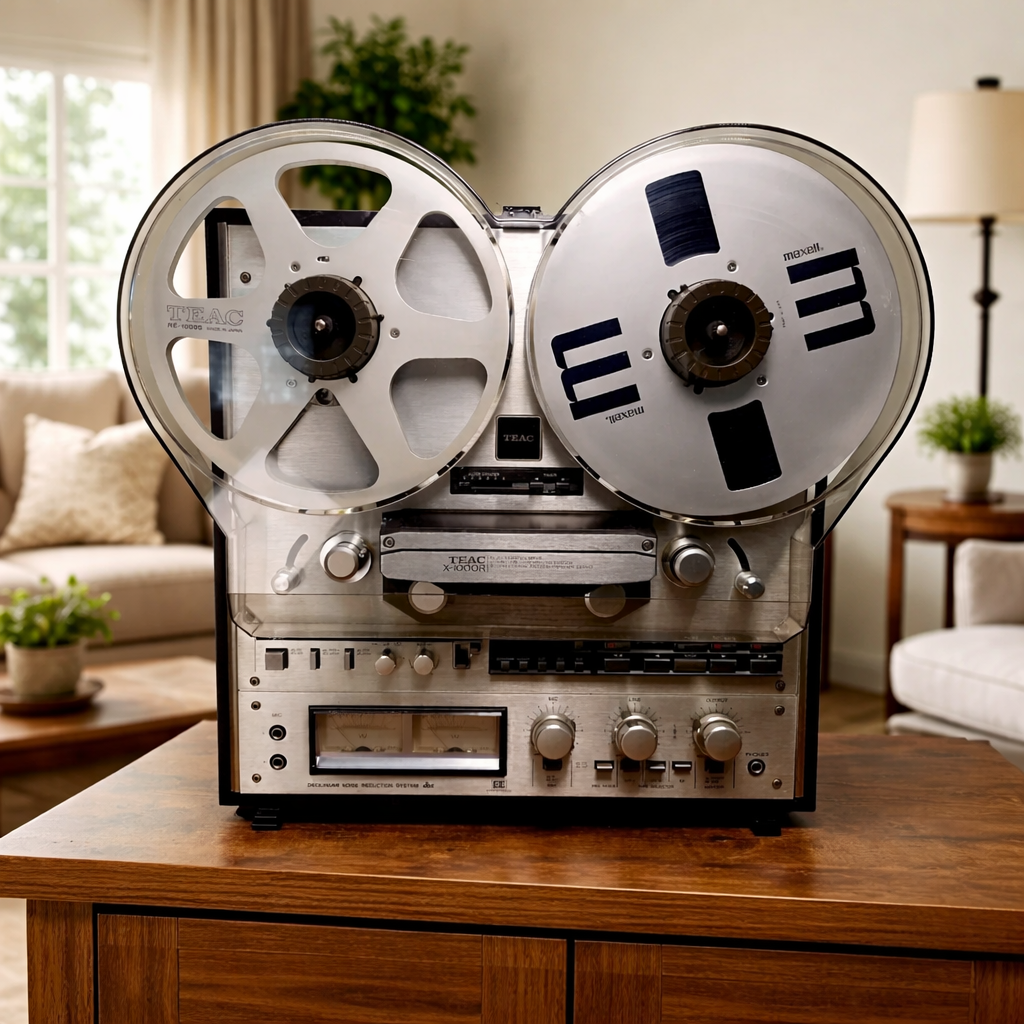
TEAC X-1000R auto-reverse reel-to-reel tape deck
About the TEAC X-1000R: Consumer-grade auto-reverse 2-track reel-to-reel tape deck from 1978 featuring 7-inch reel capacity and convenient auto-reverse playback. While popular for its features and affordability, the X-1000R is known for plastic components that may require special attention during restoration. Part of TEAC's "X" series designed for home audio enthusiasts.
⚠️ Known Issues: The X-1000R utilizes plastic gears, idlers, and structural components that are prone to wear and breakage. Some parts may be difficult to source. Many units require both capacitor replacement and mechanical component restoration for reliable operation.
Common Issues & Solutions
1. Auto-Reverse System Problems
- Auto-reverse not engaging: Check plastic end-of-tape sensors, clean foil detection contacts, inspect switching mechanism
- Erratic direction switching: Replace logic circuit capacitors (C501-C506), clean mode switches
- One direction works, other doesn't: Inspect head positioning mechanism, verify direction-switching relay
- Mechanical jamming during reverse: Lubricate direction-change mechanism, inspect plastic linkages for cracks
2. Transport & Mechanical Issues
- Belts slipping or broken: Replace main drive belt and capstan belt (common failure point)
- Plastic idler failure: Inspect rubber idler wheels—replace if glazed, cracked, or flat-spotted
- Speed instability: Replace motor run capacitor, clean capstan and pinch roller, adjust speed pots
- Tape path misalignment: Check plastic tape guides for wear, adjust guide height if needed
- Take-up motor weak: Check motor capacitor, clean motor commutator, verify clutch operation
- Transport functions intermittent: Clean logic switches, inspect plastic mode selector mechanism
3. Audio Problems
- Weak or no output: Replace audio path capacitors (C101-C106), clean tape heads
- One direction sounds bad: Clean corresponding playback head, check head switching relay
- Hum in audio: Replace power supply filter capacitors (C901-C904)
- Distorted playback: Check bias circuit, replace coupling capacitors, clean rec/play switch
- Recording not working: Verify bias oscillator, check rec/play switch, test record amplifier caps
4. Electrical Issues
- No power: Check fuse, test power switch, verify transformer output
- VU meters not working: Replace meter lamps, check meter driver capacitors
- Intermittent operation: Replace main filter capacitors, check solder joints on circuit boards
Critical Capacitor Replacement Locations
| Location |
Capacitor Type |
Typical Values |
Symptoms When Failed |
| Power Supply (C901-C904) |
Electrolytic |
1000-2200μF, 25-35V |
Hum, weak performance, intermittent operation |
| Audio Amplifiers (C101-C106) |
Electrolytic Film |
1-47μF, 16-25V |
Weak sound, frequency loss, channel dropout |
| Motor Control (C701-C703) |
Electrolytic |
1-10μF, 16-50V |
Motor won't run, speed problems |
| Auto-Reverse Logic (C501-C506) |
Electrolytic |
10-47μF, 16V |
Auto-reverse malfunction, erratic switching |
| Bias Oscillator (C801-C802) |
Film Ceramic |
0.001-0.047μF, 50-100V |
Poor recording quality, insufficient erase |
| Playback EQ (C201-C204) |
Electrolytic |
0.47-10μF, 16-25V |
Incorrect frequency response, dull sound |
| VU Meter Circuit (C401-C402) |
Electrolytic |
10-47μF, 16V |
Meters dead, sluggish, or erratic |
Belt Replacement Guide
The X-1000R uses multiple belts that commonly fail:
- Main Drive Belt: Connects motor to capstan flywheel (approximately 150mm circumference)
- Counter Belt: Drives tape counter mechanism (small, typically 80-100mm)
- Belt Condition: Check for stretching, glazing, cracking, or oil contamination
- Replacement Source: Generic belts or TEAC-specific replacement kits available
- Installation Tip: Clean all pulleys with isopropyl alcohol before installing new belts
Auto-Reverse Mechanism Service
The X-1000R's auto-reverse system requires careful maintenance:
- Dual Playback Heads: Two heads (one for each direction) must be cleaned and aligned
- End-of-Tape Detection: Metal foil sensors trigger direction change—keep clean
- Plastic Components: Inspect all plastic gears and linkages for wear or cracks
- Logic Circuit: Replace timing capacitors (C501-C506) for reliable switching
- Direction Relay: Test and clean relay contacts—common source of intermittent operation
- Mode Switches: Clean with DeoxIT contact cleaner for reliable function changes
Plastic Component Issues
The X-1000R's cost-effective design includes plastic parts that may fail:
- Plastic Idler Wheels: Check for flat spots, cracks, or complete disintegration
- Plastic Gears: Inspect for stripped teeth, especially in auto-reverse mechanism
- Structural Plastic: Check mounting brackets and chassis components for cracks
- Tape Guides: Plastic guides may wear—verify smooth tape travel
- Parts Availability: Some plastic parts difficult to source—3D printing may be option
- Preventive Care: Avoid over-tightening screws in plastic threads
Capacitor Replacement Recommendations
- Power Supply: Nichicon KZ or Panasonic FR series 105°C low-ESR
- Audio Signal Path: WIMA MKS2 or Panasonic ECQ film capacitors preferred
- Motor Capacitors: Standard electrolytics acceptable, use 105°C rated
- Complete Recap: Replace all electrolytics—typically 20-30 capacitors total
⚠️ Safety Warning: Disconnect power before opening the unit. While voltages are lower than professional models, still exercise caution. Discharge capacitors through a 10kΩ resistor. If inexperienced, seek professional help.
Head Cleaning & Alignment
Proper head maintenance for both directions:
- Dual Head Cleaning: Clean both playback heads (forward and reverse) regularly
- Cleaning Solution: Use 99% isopropyl alcohol with lint-free swabs
- Demagnetization: Demagnetize both heads monthly
- Azimuth Alignment: Separately adjust each head for optimal high-frequency response
- Pinch Roller: Check for hardening, flat spots, or glazing—replace if needed
Maintenance & Service Tips
- Belt Inspection: Check belts every 2-3 years—replace at first sign of wear
- Lubrication: Apply light synthetic oil to motor bearings and pivot points
- Plastic Care: Avoid harsh solvents that may damage plastic components
- Gentle Handling: Don't force controls—plastic mechanisms are fragile
- Storage: Store in climate-controlled environment to prevent plastic degradation
- Regular Use: Exercise monthly to prevent lubricant migration and rubber hardening
Common Symptoms of Failing Components
- Auto-reverse not working (logic caps, direction relay, plastic gears)
- Belts slipping or complete transport failure (drive belts)
- One direction sounds good, other bad (head alignment, switching relay)
- 60Hz hum in audio (power supply filter caps)
- Weak or distorted sound (audio path caps, head contamination)
- Speed fluctuation (motor caps, belt slippage, idler wear)
- VU meters not working (meter lamps, driver caps)
- Intermittent functions (logic switches, plastic component wear)
Service Manual: The TEAC X-1000R service manual includes detailed mechanical diagrams essential for plastic component identification and adjustment procedures.
Replacement Priority
For optimal results, address issues in this order:
- Drive Belts - Essential for any operation
- Power Supply Capacitors (C901-C904) - Affects entire unit
- Plastic Component Inspection - Assess mechanical condition
- Audio Path Capacitors (C101-C106, C201-C204) - Sound quality
- Auto-Reverse Logic (C501-C506) - Direction switching
- Motor Capacitors (C701-C703) - Transport reliability
Expected Results After Service
After complete restoration (assuming plastic components are intact):
- Reliable auto-reverse operation in both directions
- Improved audio quality and signal-to-noise ratio
- Stable tape speed with minimal wow and flutter
- Consistent transport operation
- 10-15 years additional service life with proper maintenance
Reality Check: The X-1000R's plastic components make it less reliable than metal-construction models like the A-series. Setting realistic expectations is important—this is a consumer-grade deck with inherent limitations due to its construction.
Professional X-1000R Restoration Available
Complete capacitor replacement, belt replacement, and mechanical service
✓ 1-year warranty on all repairs
✓ Complete testing in both directions
✓ Honest assessment of mechanical condition
Request Service
Call (818) 244-4440